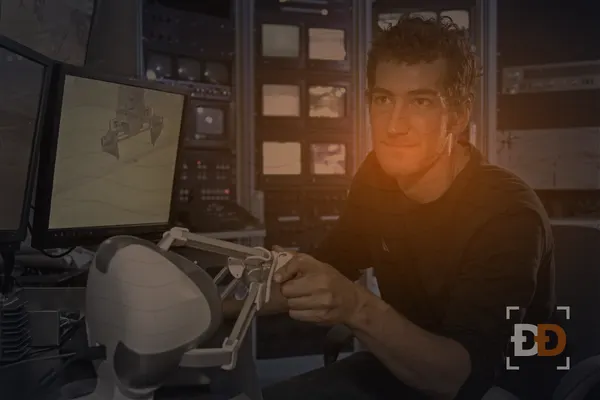
Yes, some robot teleoperation jobs run from home, but they are the smaller share. A teleoperator steers a robot through a task with a VR headset, hand controllers or a console, and most companies still keep those operators at their own lab, next to the robots.
The home-based roles exist because the robot only needs your movements, sent over the internet fast enough to copy them. Whether a job is remote comes down to who resets the robot when a run ends, and the job post usually says. For the wider field, from lab data collection to filming chores, see how robot training jobs work.
Most teleoperation still happens at the company’s lab
A training run ends with the scene in a mess: the towel half folded, the box on the floor, the robot’s arm stopped at an odd angle. Someone has to put the scene back before the next run, and that person is usually the operator. On-site, you take off the headset, reset the table and start again. From home, someone else at the lab has to do it for you, which costs the company a second person.
Labs also want operators close by for the robots themselves. Arms jam, grippers wear out and cameras drift out of place, and an operator in the room spots the problem before a whole shift of recordings goes to waste. That is why most of the jobs under robot teleoperation jobs name a city and a shift.
A remote teleoperation job says so in the location line
Read the location line first, then the requirements. A remote role says “Remote” or names the countries it accepts, and then it lists what your home has to provide. An on-site role names the lab’s city, even when the title says “remote operator”, because in robotics “remote” can mean working away from the robot while still sitting at the lab.
A few signs tell you which kind you are looking at:
- A remote role names an internet requirement, a room requirement or equipment it ships to you.
- An on-site role names a physical requirement, such as standing for a shift or lifting a set weight.
- A hybrid role may train you at the lab for a few weeks and then move you home, and the post says how long the training lasts.
- “Remote monitoring” or “remote assistance” roles watch robots that run on their own and step in when one gets stuck. They are often remote, and they are a different job from steering each movement.
If the post doesn’t say, ask the recruiter where the robot is and who resets it. The answer settles it in one sentence.
Your setup at home has to keep the delay steady
When you steer a robot over the internet, each movement takes a moment to reach it, and the video takes a moment to come back. A short, steady delay is what makes teleoperation from home possible; a delay that jumps around makes the robot drop things. That is why remote roles care more about your connection than about your computer.
What remote teleoperation jobs usually ask for:
- A wired Ethernet connection to your router. Many teams test it before your first shift, and some won’t accept Wi-Fi at all.
- A room you can close, with enough clear floor to move your arms or stand in a headset without hitting furniture.
- A room nobody walks through during a shift, since a bumped arm sends the robot a movement you didn’t mean.
- The company’s own headset, controllers or console, which most employers ship to you and ask you to return at the end.
Upload speed matters as much as download speed, because your hand movements and sometimes your camera go up the line. Run a speed test on the cable before you apply, and if the post names a minimum, check that you meet it at the hour your shift would run, when the rest of the house is online too.
The work is repetition at a steady pace
A shift is the same task, done carefully, many times over. You pick up a cup and set it in a rack, fold a shirt, open a drawer and take out a tool, and each run is recorded as training data. The lab changes small things between runs, such as where the cup sits or which shirt it is, so the robot learns to handle the variety.
The runs that count are the clean ones. A run where you fumbled, paused for a long time or knocked something over usually gets flagged, and many teams ask you to flag it yourself. Saying “that run went wrong” is part of the job, and teams trust the operators who say it.
Time in a headset is tiring in a way that sitting at a desk isn’t. Eye strain, sore shoulders and motion sickness are common in the first weeks, and most teams schedule a break every hour or so for that reason. Teleoperators at home need the same discipline, because there is no lead in the room to tell you to stop.
The tryout tests steadiness and care
Most teleoperation employers hire on a practical test more than on a resume. You get the controls, a short training session and a simple task, and the team watches how you learn it. They are looking for a few things:
- Whether your movements get smoother and more consistent over a dozen tries.
- Whether you finish the task the same way each time, instead of finding a new shortcut on each run.
- Whether you notice and say when a run went wrong.
- Whether you can follow a written instruction exactly, such as “grasp the cup by the handle, never the rim”.
For a remote role, the tryout often runs on your home setup, so it doubles as a test of your connection and your room. Experience that helps: VR gaming, drone flying, forklift or crane operation, and any job where you repeated a careful task and logged it. A steady hand and a clean log count for more than a robotics degree.
Watch the safety rules even from a distance
A robot you steer from home still moves in a real room, sometimes near the people who work in it. Teleoperation teams have a stop procedure, and you learn it before your first run: how to freeze the robot, when to hand control back and who to call.
The rules that come up most:
- Stop right away when someone walks into the robot’s work area, even if they wave you on.
- Never try to finish a run after the video freezes or stutters. Let go of the controls and wait.
- Report each collision, however small, in the shift log.
- Keep what you see on the robot’s cameras to yourself. Most teams ask you to sign a confidentiality agreement about the robots and the spaces they work in.
How to find a robot teleoperation job you can do from home
- Filter robot teleoperation jobs for remote roles, and check remote robot training jobs for remote monitoring work too.
- Read the location line and the setup requirements before anything else. Skip roles that need a city you can’t reach.
- Test your home connection on a cable at the hour you would work, and clear a corner of a room for the headset.
- Lead your application with the habits the tryout tests: shifts you kept, equipment you operated, logs you wrote.
- If you can’t find a remote steering role, filming tasks at home and annotation are the robot training work most often done from home, and they build the same habits.
A legitimate robotics company doesn’t charge you for training or equipment. If someone asks you to buy a headset and claim the money back later, walk away.